ServicesHubSpot

HubSpot, made to fit how you work.

We set up and improve HubSpot around your sales, marketing and service workflows. We connect it to your other systems and build custom features where your team needs them.

HubSpot Platinum Solutions Partner badgeHubSpot Platinum
Solutions Partner
We migrate to HubSpot from:ZendeskSalesforceZohoDynamicsSpreadsheetsOther platforms
What we work on
  1. Customer recordsOne source of truth
  2. Other systemsIntegrations
  3. WorkflowsSales, marketing, service
  4. ReportsAgreed definitions

Where we’re usually called in.

  • Customer details sit in a CRM, a billing tool and several spreadsheets, and you want one source of truth.
  • Your teams need consistent data, workflows and reporting definitions.
  • Staff enter the same details into more than one system.
  • You’re moving from another CRM, a help desk or spreadsheets and want to keep the history.
  • You’re weighing up HubSpot, or have just chosen it, and want it set up around your team from the start.
  • You want to make more use of your existing HubSpot setup.
01

Set up HubSpot around your team.

New to HubSpot? We set up the hubs you need around how your team works: pipelines, properties, permissions, forms and reports, with training and a handover.

02

Improve your existing setup.

We review the data, workflows and configuration against what your team needs today, then tidy, fix and add what’s missing.

03

Plan and deliver your migration.

Contacts, companies, tickets and history from whatever you use now, whether that’s another CRM, a help desk or spreadsheets, with the mapping agreed and tested before cutover.

04

Connect your other systems.

Native integrations where they do the job. Where they don’t, a small, documented custom integration in AWS Sydney that you own.

05

Support the work after launch.

Changes, new workflows and fixes as your team uses HubSpot more.

Custom features for your workflows.

We use HubSpot’s native features and integrations wherever they do the job. Where your team needs more, we build custom record cards, integrations, rules and AI features. Each example below is from a client project, most of them in healthcare.

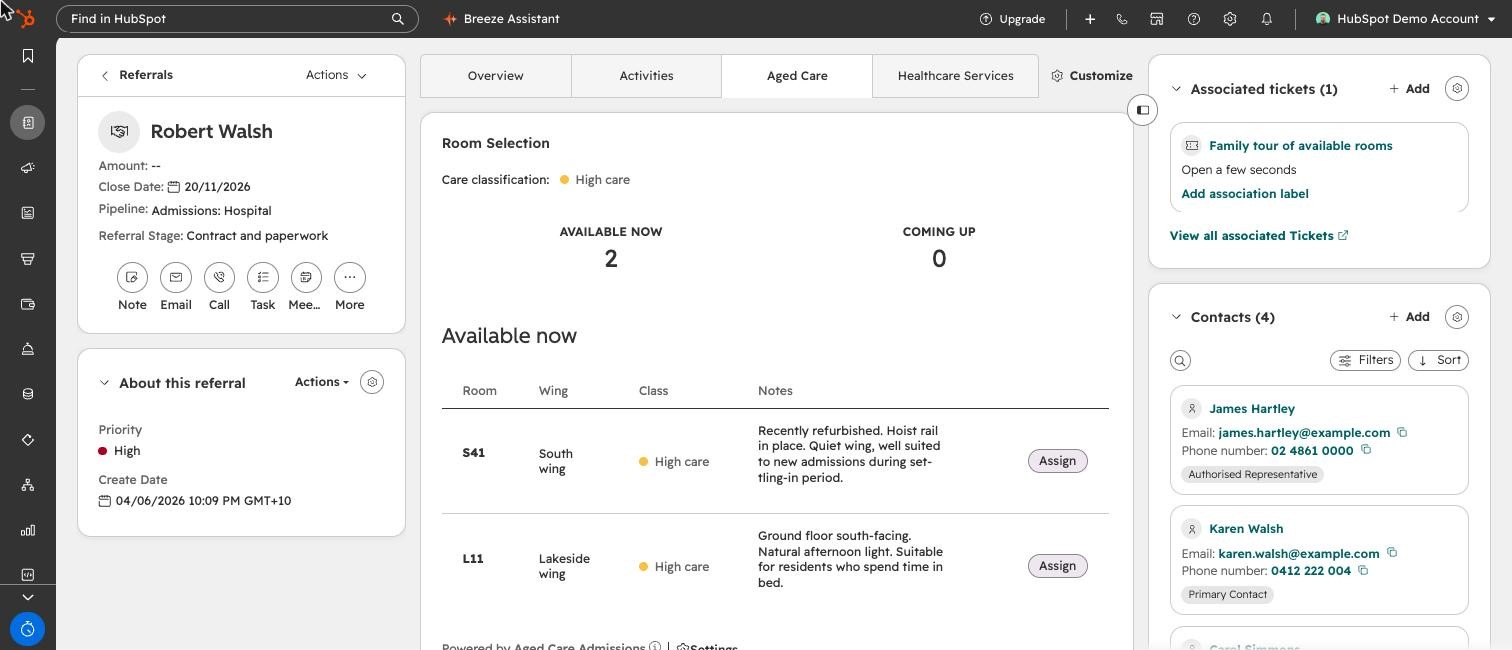
A HubSpot referral record with our Room Selection card open: the resident needs high care, two rooms are free now, and each can be assigned with one click.
Room-selection card shown with demonstration data.
The need

Work from another system inside HubSpot

What we build

Record cards that show live data from the systems your team already uses, with actions such as booking taken from HubSpot.

Example: Appointments and booking from a clinic’s practice management system.

See the use case →
The need

Apply your business rules

What we build

Rules checked at the moment staff act, so bookings, approvals and renewals follow your policy.

Example: Scheduling that stays within a client’s approved funded hours.

See the use case →
The need

Move work on when the pieces arrive

What we build

A checklist of what a record is waiting on. As each item arrives, the deal moves through its stages on its own.

Example: Medical cases that progress as specialist reports come in.

See the use case →
The need

Connect the platforms your team logs into

What we build

Integrations that let staff look up and act on another platform from the HubSpot record, with the results reported in HubSpot.

Example: Program enrolments on a learning management system (LMS).

See the use case →
The need

Add AI to a specific decision

What we build

We use Breeze, HubSpot’s own AI, wherever it does the job. Where a task needs your own rules, data from outside HubSpot or a result inside a custom record card, we add an AI model for that one task, with the reasoning shown and staff making the call.

Example: Suggesting the best-suited practitioners for a new client, with a score and reason for each.

See the use case →
See all the use cases →HubSpot for healthcare →

Where we work in HubSpot

HubSpot Smart CRMHubSpot Sales HubHubSpot Service HubHubSpot Marketing HubHubSpot Content HubHubSpot Data Hub
  • Sales, Service, Marketing and Content hubs
  • Data Hub sync and custom code
  • Custom objects, cards and app extensions
  • Workflows, pipelines, reporting and permissions
  • Licence reviews, so you pay for the hubs and seats you use

Questions.

Can you work in a portal another partner set up?

Yes. We start with an audit so we understand what’s there before changing anything.

How long does a HubSpot implementation take?

It depends on the scope. As a guide, a focused setup for one team often takes four to six weeks, and integrations and migrations add time. We agree the timeline with the scope before you commit.

Can you work with our HubSpot rep?

Yes. We work alongside your HubSpot rep on licences and timing, so you get one plan.

What happens to our data during a migration?

We agree how every field maps first, test the move on a sample, then run the final migration with a checklist. Your old system can usually stay available until you’ve checked the result, and we agree how before setting the cutover date.

Do we need a bigger HubSpot licence?

Not necessarily. We review the features and access your team needs before recommending licences.

Tell us what your team needs from HubSpot.

Talk to us →