Every report a case is waiting on, in one place.
A practice that prepares medical reports for compensation claims moved its case work into HubSpot, with cards that track the imaging, specialist reports and requests for information each case needs.


The problem
A lean team tracked what each case was waiting on by hand, with a lot of double handling of information and documents.
What we set up
- Each case’s outstanding imaging, specialist reports and requests for information on the case record.
- Requests for information started early, before the case is approved.
- One pipeline for every claim, from referral to report sent.
What we built
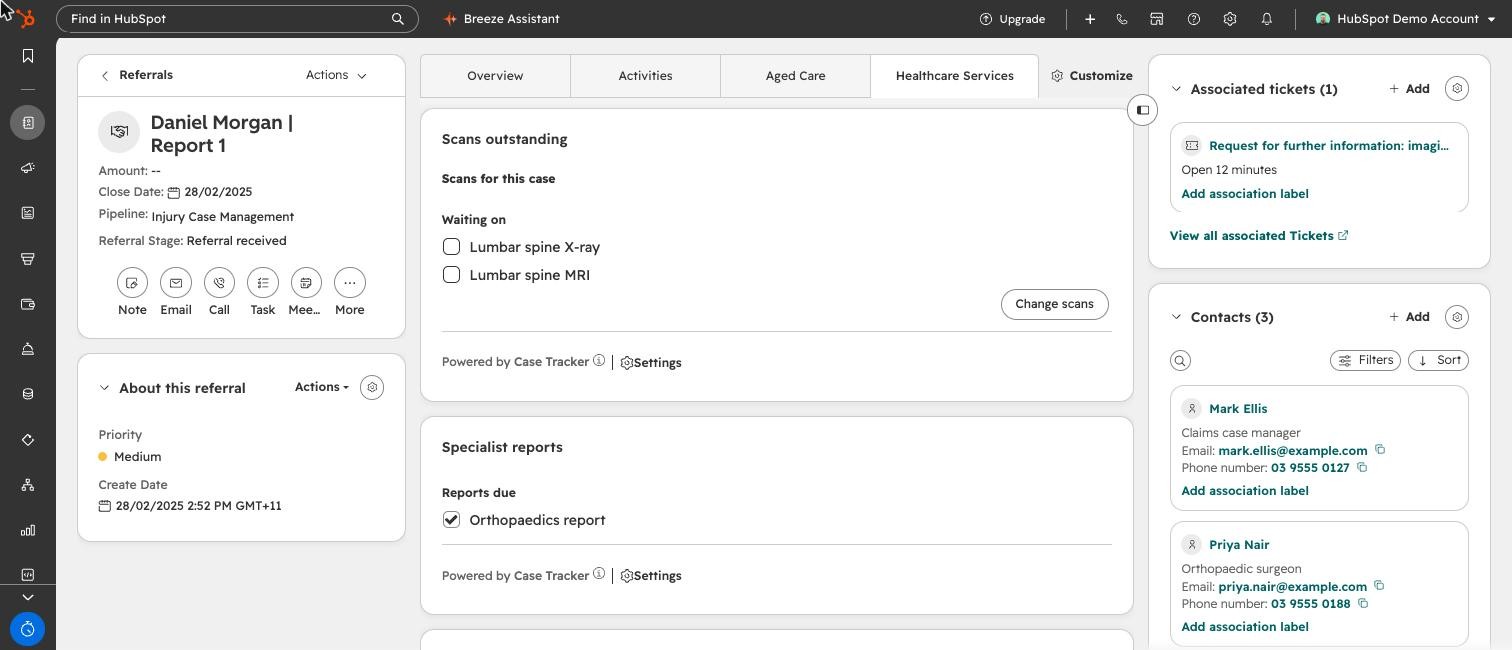
A case pipeline from referral to report, with cards that show the imaging, specialist reports and information each case still needs.
Why they moved
The practice ran lean, with very little technology support. The work was labour intensive, with a lot of double handling of information and documents.
Each case waits on several things before a report can be written: imaging, specialist reports and answers to requests for information. Keeping track of what was still outstanding took time the team didn’t have.
They wanted their nurses to complete requests for information early, so the practice was ahead when the funder approved a case.
The project
We set up HubSpot to run each case from referral to report, and built cards that track what each case is still waiting on.
A checklist that matches each case
Every case needs a different mix of imaging, specialist reports and information. The cards show only what this case needs, and what’s still outstanding, on the case record itself.
Staff tick items off as results arrive, and the record keeps who updated it and when. Nobody has to open a spreadsheet to see what a case is waiting on.
- Requirements set for the case
- Results ticked off as they arrive
- Outstanding items visible
- Report written